
VoidQuest is a family app in which children collect coins for everyday tasks. With those coins they
stick stickers into albums, page by page, until the album is full. This briefing describes what we
need for one album and how the files must look so the app can take them over without rework. The
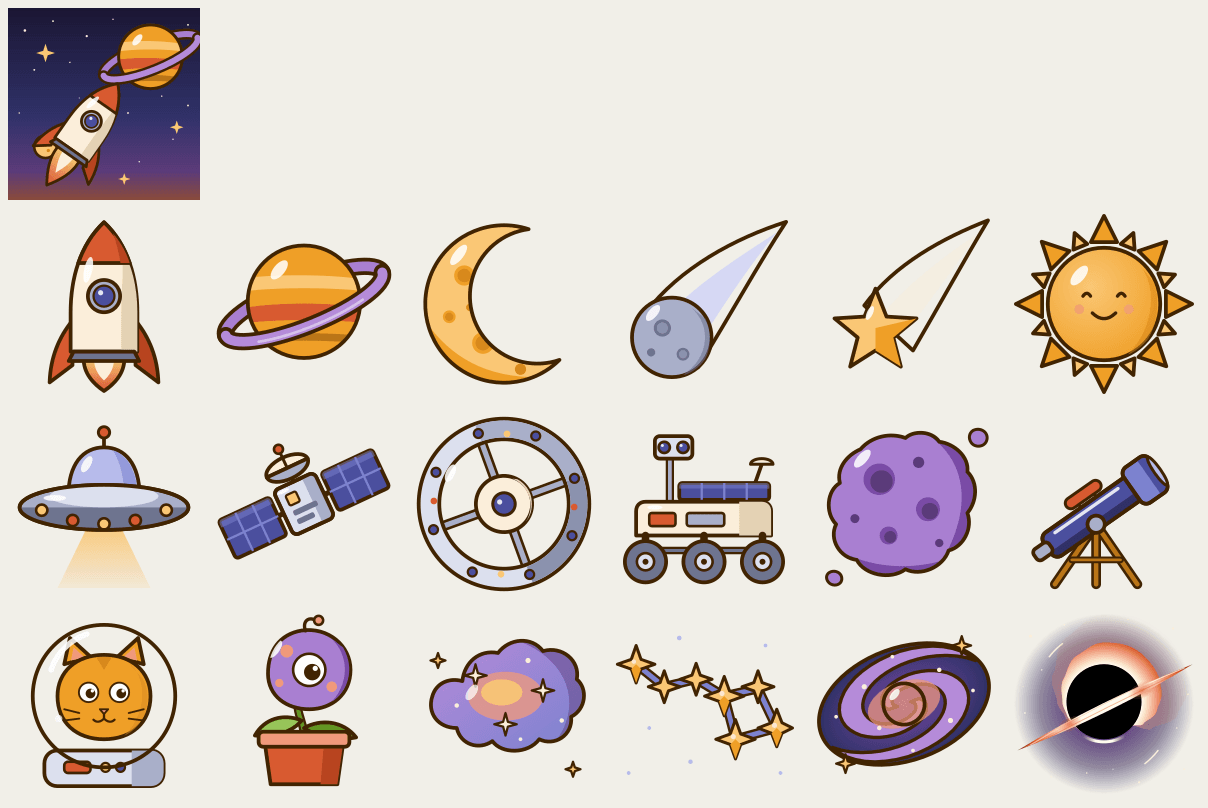
folder weltraum, the album "Weltraum" (Space), is the reference example, and the contact sheet
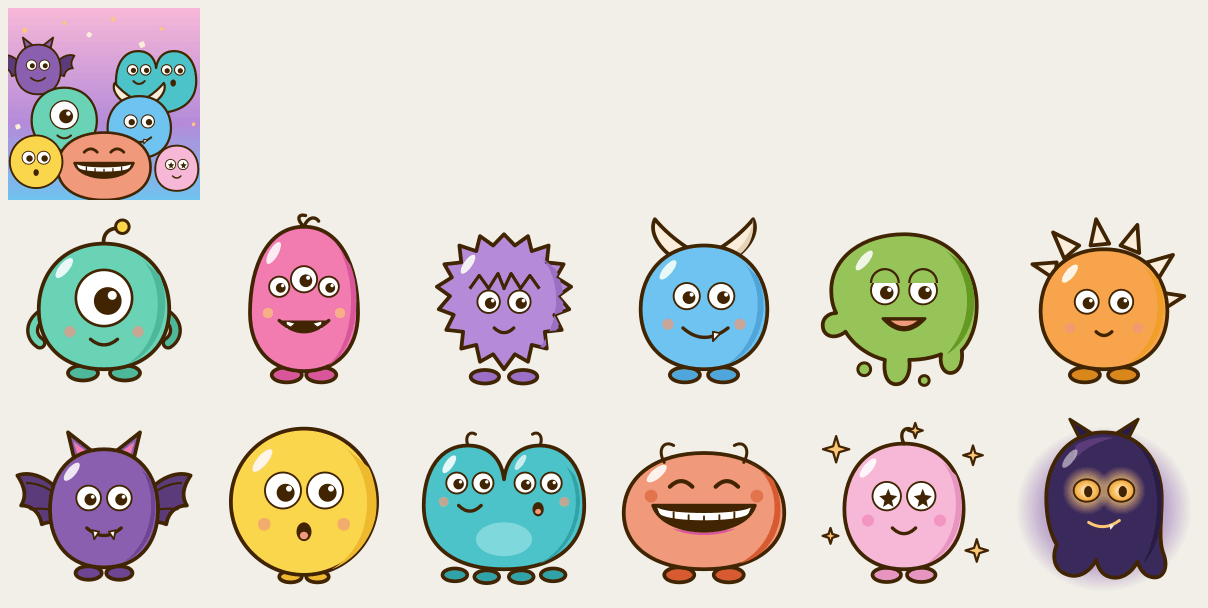
weltraum-contact-sheet.png shows all of its stickers in album order; monster-parade is the
second album with twelve stickers. The sister document
02-avatar-format.en.md describes the avatar characters; both briefings share style and palette.
What an album is
An album is a collection of 12 or 18 stickers on one theme: the Black Forest, Stuttgart, winter, the sea, dinosaurs. The app shows the album as pages with 6 fixed slots each (two rows of three), which the child scrolls through one below the other; 12 stickers are two pages, 18 are three. Every sticker has its fixed slot. As long as the child does not have it yet, it sees its silhouette there (the outline shape of the sticker, filled cream with a fine contour, without colours or details) with the coin price; once stuck in, the sticker stays there in colour for good. The child gets the stickers with coins in whatever order it chooses, or receives them as gifts (from the parents, from grandma, from a sibling). A full album earns the child an achievement "Album komplett" (album complete), a reward the parents have promised, and a part for its avatar character that only exists with this album (for "Weltraum" the astronaut helmet for the character "Funke" (Spark), for "Monster-Parade" its monster horns).
Canvas and margin per sticker
Every sticker is its own file on a square canvas of 1024 x 1024 pixels with a transparent background. From it the app renders images of 512 pixels (the stuck-in sticker) and 256 pixels (the silhouette). The motif fills the canvas, roughly 40 pixels stay clear on all edges, nothing extends beyond the edge, no shadow lies on the canvas. The app places the sticker unchanged into a white slot with rounded corners; it crops nothing and tints nothing.
The shape of the sticker is free: round, angular, cut out like a die-cut sticker, with or without a white sticker border. Only one thing applies: the sticker must be legible at 45 pixels. That is how small it flies across the screen in the gift moment; in the album itself it is about 60 to 80 pixels, on the cover tile grid roughly 70. Only in the sticker detail at 170 pixels may a motif show particulars; there it must not look empty. And because the app shows a sticker that is not stuck in yet as a silhouette (only the outline shape, filled cream with a fine contour; inner lines and colours fall away), the outline alone must already give away what the sticker is: a lynx stays recognisable as an animal, even without colour and without inner drawing.
What a sticker shows
- Exactly one motif per sticker: an animal, a building, a plant, an object, a shape. No scene, no background, no landscape behind the motif.
- No humans, no lettering, no weapons. Known characters, brands and logos from film, games or advertising only if we hold the usage rights for them; we name that explicitly when commissioning, otherwise the rule is: none, not even as an allusion. Landmarks and animals are welcome, people never.
- Legible for a child between seven and twelve: clear outlines, few details, large areas.
- Uniform line weight and one light direction for all stickers of an album (for "Weltraum" light from the top left, a soft darker edge that follows the outline of the motif, one white highlight).
- Colours as flat fills with soft shading. No pure black; a dark brown for outlines. The app's palette lives in the sunrise: amber, ember, sage, sky. An album may have its own accent colours (a winter album may be cool), as long as it does not look foreign next to the other albums.
Rarity
Every sticker carries one of three tiers that determines its coin price: common, rare, special. We set the tier together; the drawing may show it.
| Album | common | rare | special |
|---|---|---|---|
| 12 stickers | 9 | 2 | 1 |
| 18 stickers | 13 to 14 | 3 | 1 to 2 |
Common stickers are the base of the album, simple and quickly earned. Rare stickers may be a little more elaborate. Special stickers are the showpiece of the album: they may carry more detail, a shine, a halo of light, a golden edge, a sense of motion, and they sit in the last slot of the album (for "Weltraum" the Milky Way in slot 17 and the black hole in slot 18). Even a special sticker stays drawn flat; the shine comes from shapes and soft gradients, not from filters or effects.
The cover
The cover is the image the child sees on the albums tab before it opens the album. There are two kinds, and we decide per album which one applies:
- Tile grid: no image of its own; the app arranges the first four stickers as a grid and shows which ones the child already has. Nothing needs to be delivered for this.
- Own motif: a file
cover.svg, square on the same canvas of 1024 x 1024 pixels, that shows the theme of the album as one image: the Black Forest with a fir and a lynx, a night sky full of stars. Unlike a sticker, the cover may have a background and fills the whole square to the edge; the app cuts the rounded corners. No lettering: the app sets the album title below the cover. "Weltraum" (a night sky with a planet and a rocket) and "Monster-Parade" (the monsters as a crowd) each show a cover motif.
Optional is a promotional image in free format (the open album with a few stickers, a crop for marketing). It is delivered next to the album folder, never inside it: every image file in the folder counts as a sticker.
Files and names
- One folder per album, named in lower case without umlauts and spaces (
weltraum,monster-parade,schwarzwald,winter-2026). - A sticker is a file
<nn>.svg, a two-digit number starting at01(01.svg,12.svg). The number is the slot in the album:01to06are page 1,07to12are page 2,13to18are page 3. So the order is a design decision: what sits side by side on a page should look good together, and the special sticker comes last. cover.svgis the cover, only if the album gets a motif of its own.- SVG is the delivery format, with
viewBox="0 0 1024 1024". Areas as flat fills, soft gradients are allowed, no filters, no embedded raster image, no external fonts, and text is not allowed anyway. Why SVG: the file is lossless and can be re-rendered at any size, from the 45-pixel flight to the detail view. The app itself never loads the source file; our pipeline renders from it the images the app shows. - PNG (1024 x 1024, transparent, 8 bits per channel; the cover 1536 x 1536) only as an exception for
painted textures that cannot be expressed in SVG; the names stay the same (
07.png).
A sticker that is in the app once is never changed again under the same file name. A new version gets a new file name, which we will then name.
Delivery
One folder per album with all SVG files and, where applicable, the cover, plus the source file
(.ai, .fig or the working SVG with all layers). For the texts in the album a simple table per
sticker:
| Number | Title (short, for children) | Rarity | Line | Source file |
|---|---|---|---|---|
| 07 | UFO | rare | Das UFO kommt von weit her zu Besuch. | 07.svg |
| 18 | Schwarzes Loch | special | Das Schwarze Loch verschluckt sogar das Licht. | 18.svg |
The title is one word, two at most. The line is one sentence that a primary-school child reads on its own, without dashes; it sits in the sticker detail below the image and may explain something ("Der Luchs lebt wieder im Schwarzwald.", the lynx lives in the Black Forest again). Title and line may be suggestions; we revise them with the app's glossary. Plus one title and one sentence for the album itself.
On our side the table becomes the album's manifest.json, the file the app reads: per sticker
file, title, tier (common, rare, special), line and glyph (an emoji shown if the
image ever fails to load), plus the album's title, sentence and cover kind. If you deliver the
table you need not touch the manifest; the filled example is weltraum/manifest.json, an empty one
ships in the starter kit.
Rights: The usage rights pass to us in full, for the app, the shop and marketing, without any limit in time or territory.
Album and character as a set
An album can belong to an avatar character: the album "Schwarzwald" (Black Forest) pairs with a
character or a set of parts in the same style, and the part the child gets with the full album picks
up the theme (a fir-tree hat, a lynx tail). For these parts the avatar briefing
(02-avatar-format.en.md) applies: they live in the character's folder on its canvas with its
anchor points, not in the album folder. A set of album and matching parts is the larger package for
us; we say when commissioning whether an album alone or a set is wanted.
Checklist before handover
- 12 or 18 stickers, files
01.svgto12.svgor18.svg, 1024 x 1024, transparent (PNG only as an exception). - Every sticker shows exactly one motif, without background, without shadow on the canvas, with 40 pixels of clear margin.
- Every sticker is legible at 45 pixels and recognisable as a silhouette.
- Rarity distributed as in the table; the special sticker sits in the last slot.
- One line weight, one light direction, one palette for the whole album.
-
cover.svgonly with an own cover motif, without lettering, the square filled. - No humans, no lettering, no weapons; third-party characters and brands only with usage rights we have named.
- Table with number, title, rarity, line and source file is included, plus title and sentence of the album; source file and transfer of rights are settled.
Reference: Weltraum and Monster-Parade
weltraum is the reference album: eighteen motifs from outer space, from the rocket to the black
hole, as flat areas with a dark brown outline, a soft shadow that follows the outline and one
highlight; cool night blues and violets with warm accents from the app's palette. 13 common, 3 rare
(UFO, space station, astro cat) and 2 special stickers (the Milky Way in slot 17, the black hole in
slot 18), with a cover of its own. The contact sheet weltraum-contact-sheet.png shows the cover in
the first row, then one row of six stickers per album page in slot order, each on its whole canvas,
the way the child sees the pages. monster-parade-contact-sheet.png shows the same for the second
album: twelve friendly monsters in candy colours and in the visual language of the character Funke
(round bodies, big eyes), 9 common, 2 rare (Flatter, Zwilling) and 1 special sticker (the shadow
monster in slot 12).